> ## Documentation Index
> Fetch the complete documentation index at: https://docs-staging-feat-acul-js-sdk-1-7-0-docs.mintlify.site/llms.txt
> Use this file to discover all available pages before exploring further.

> Learn how to configure an update policy form using Forms for Actions for users to review and accept new terms of service or consent updates.

# Use Cases: Configure an update policy form using Forms

<Card title="Before you start">
  1. Create a [Machine-to-Machine Application](/docs/get-started/auth0-overview/create-applications/machine-to-machine-apps) with the following scopes enabled:

  * `read:users`
  * `update:users`
  * `create:users`
  * `read:users_app_metadata`
  * `update:users_app_metadata`
  * `create:users_app_metadata`

  2. Add a [Vault connection](/docs/customize/forms/vault) using the M2M application credentials.
</Card>

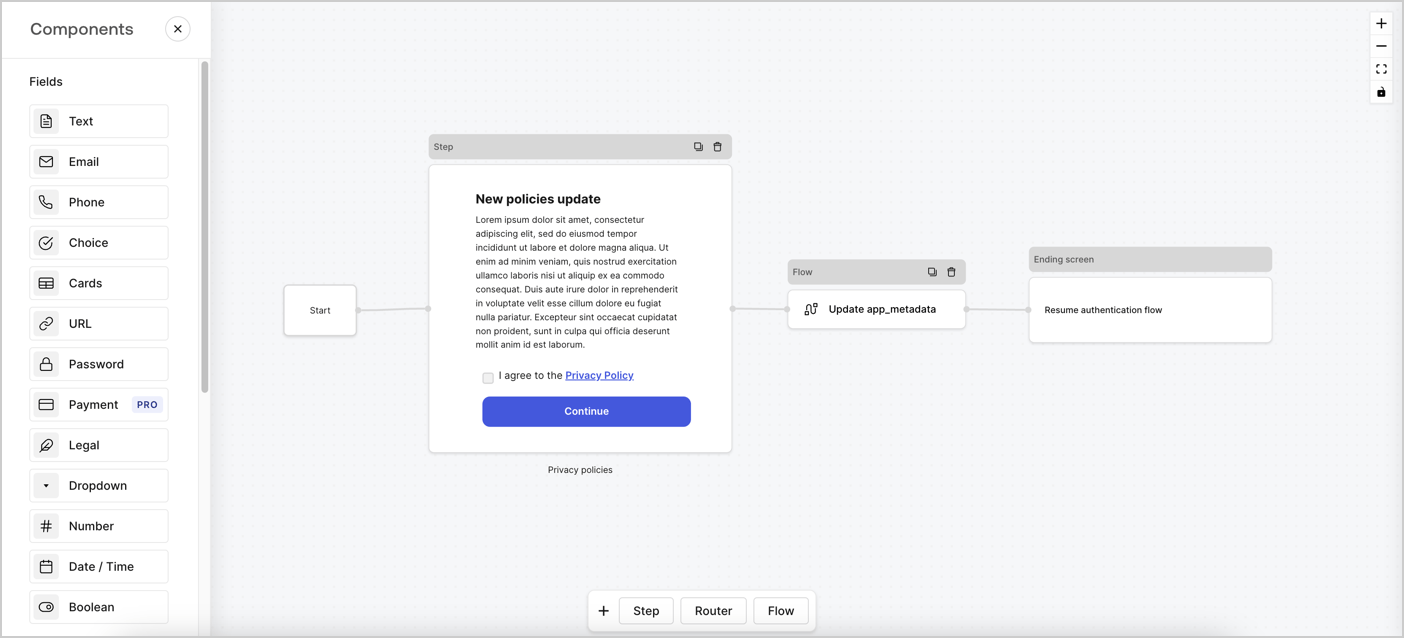
Forms for Actions allows you to create custom privacy policies flows and store the consent under the `app_metadata` object.
<Frame>
  <img src="https://mintcdn.com/docs-staging-feat-acul-js-sdk-1-7-0-docs/BBoh2i8DRnlTJSC0/docs/images/cdy7uua7fh8z/6i68dMvHDTijfRmSgN1x8Q/ad900e7d4c0fb34645921435472b8684/privavy-policy-form.png?fit=max&auto=format&n=BBoh2i8DRnlTJSC0&q=85&s=1ec6fecd783b29e935b8fd8de8d0478b" alt="Dashboard > Actions > Forms > Privacy policy use case" data-og-width="1404" width="1404" data-og-height="638" height="638" data-path="docs/images/cdy7uua7fh8z/6i68dMvHDTijfRmSgN1x8Q/ad900e7d4c0fb34645921435472b8684/privavy-policy-form.png" data-optimize="true" data-opv="3" srcset="https://mintcdn.com/docs-staging-feat-acul-js-sdk-1-7-0-docs/BBoh2i8DRnlTJSC0/docs/images/cdy7uua7fh8z/6i68dMvHDTijfRmSgN1x8Q/ad900e7d4c0fb34645921435472b8684/privavy-policy-form.png?w=280&fit=max&auto=format&n=BBoh2i8DRnlTJSC0&q=85&s=83c4a9a91a6511115e6fb405b09ccf5f 280w, https://mintcdn.com/docs-staging-feat-acul-js-sdk-1-7-0-docs/BBoh2i8DRnlTJSC0/docs/images/cdy7uua7fh8z/6i68dMvHDTijfRmSgN1x8Q/ad900e7d4c0fb34645921435472b8684/privavy-policy-form.png?w=560&fit=max&auto=format&n=BBoh2i8DRnlTJSC0&q=85&s=b14fdfe7e9d0d6d8d5462735a4040467 560w, https://mintcdn.com/docs-staging-feat-acul-js-sdk-1-7-0-docs/BBoh2i8DRnlTJSC0/docs/images/cdy7uua7fh8z/6i68dMvHDTijfRmSgN1x8Q/ad900e7d4c0fb34645921435472b8684/privavy-policy-form.png?w=840&fit=max&auto=format&n=BBoh2i8DRnlTJSC0&q=85&s=fa359baced122d6e35f2ed17b23bb73e 840w, https://mintcdn.com/docs-staging-feat-acul-js-sdk-1-7-0-docs/BBoh2i8DRnlTJSC0/docs/images/cdy7uua7fh8z/6i68dMvHDTijfRmSgN1x8Q/ad900e7d4c0fb34645921435472b8684/privavy-policy-form.png?w=1100&fit=max&auto=format&n=BBoh2i8DRnlTJSC0&q=85&s=822461300abd4180bf0d81f01aa4afd5 1100w, https://mintcdn.com/docs-staging-feat-acul-js-sdk-1-7-0-docs/BBoh2i8DRnlTJSC0/docs/images/cdy7uua7fh8z/6i68dMvHDTijfRmSgN1x8Q/ad900e7d4c0fb34645921435472b8684/privavy-policy-form.png?w=1650&fit=max&auto=format&n=BBoh2i8DRnlTJSC0&q=85&s=18271a36c55b4be962ba9d1b05e90a38 1650w, https://mintcdn.com/docs-staging-feat-acul-js-sdk-1-7-0-docs/BBoh2i8DRnlTJSC0/docs/images/cdy7uua7fh8z/6i68dMvHDTijfRmSgN1x8Q/ad900e7d4c0fb34645921435472b8684/privavy-policy-form.png?w=2500&fit=max&auto=format&n=BBoh2i8DRnlTJSC0&q=85&s=5704678693e65e9153868fbaaccce7d6 2500w" />
</Frame>

The sections below outline how you can create an Update Policy form using nodes and flows, along with steps for adding your form to a [Post Login](/docs/customize/actions/explore-triggers/signup-and-login-triggers/login-trigger) Action.

## Create a form from scratch

Follow these steps to create a form to gather information:

1. Open the Form editor by selecting **Auth0 Dashboard > Actions > Forms.**
2. Select **Create Form** > **Start from scratch**.

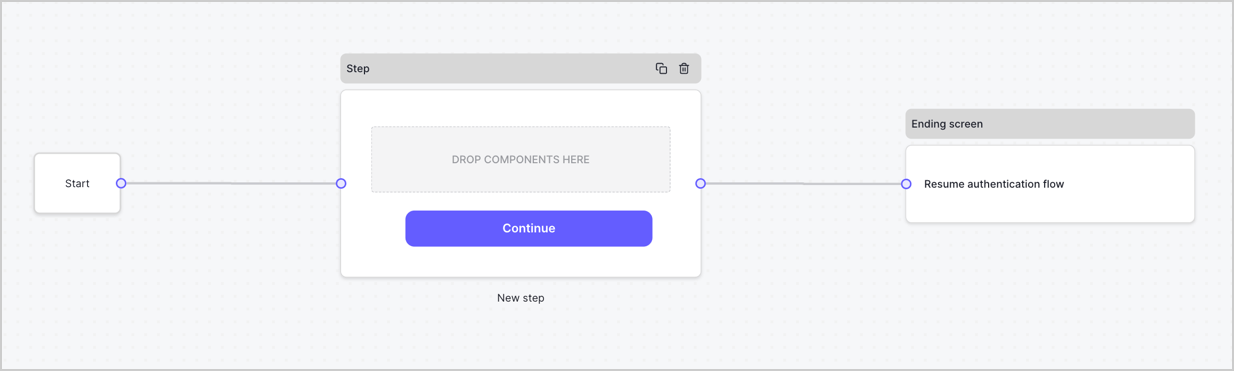
By default, a new form contains a Start node, a Step node, and an Ending screen node.
<Frame>
  <img src="https://mintcdn.com/docs-staging-feat-acul-js-sdk-1-7-0-docs/qy_cZzsCifj8OPXY/docs/images/cdy7uua7fh8z/2TZ9jSjgEcARFpULI6hz4R/a4319a1bd482f2ee5cc23100fdb2f42c/New-form-Forms-for-action-use-case.png?fit=max&auto=format&n=qy_cZzsCifj8OPXY&q=85&s=0eac22aeed7c2c6b15a31f358e94bea9" alt="Dashboard > Forms > Use Cases > Form" data-og-width="1234" width="1234" data-og-height="371" height="371" data-path="docs/images/cdy7uua7fh8z/2TZ9jSjgEcARFpULI6hz4R/a4319a1bd482f2ee5cc23100fdb2f42c/New-form-Forms-for-action-use-case.png" data-optimize="true" data-opv="3" srcset="https://mintcdn.com/docs-staging-feat-acul-js-sdk-1-7-0-docs/qy_cZzsCifj8OPXY/docs/images/cdy7uua7fh8z/2TZ9jSjgEcARFpULI6hz4R/a4319a1bd482f2ee5cc23100fdb2f42c/New-form-Forms-for-action-use-case.png?w=280&fit=max&auto=format&n=qy_cZzsCifj8OPXY&q=85&s=e2b31b7ea6bb227d33fb5491e2e135de 280w, https://mintcdn.com/docs-staging-feat-acul-js-sdk-1-7-0-docs/qy_cZzsCifj8OPXY/docs/images/cdy7uua7fh8z/2TZ9jSjgEcARFpULI6hz4R/a4319a1bd482f2ee5cc23100fdb2f42c/New-form-Forms-for-action-use-case.png?w=560&fit=max&auto=format&n=qy_cZzsCifj8OPXY&q=85&s=024a0b35e6c14352858f681b2913298e 560w, https://mintcdn.com/docs-staging-feat-acul-js-sdk-1-7-0-docs/qy_cZzsCifj8OPXY/docs/images/cdy7uua7fh8z/2TZ9jSjgEcARFpULI6hz4R/a4319a1bd482f2ee5cc23100fdb2f42c/New-form-Forms-for-action-use-case.png?w=840&fit=max&auto=format&n=qy_cZzsCifj8OPXY&q=85&s=4b44785fe27e7a844fc91b164abbdd92 840w, https://mintcdn.com/docs-staging-feat-acul-js-sdk-1-7-0-docs/qy_cZzsCifj8OPXY/docs/images/cdy7uua7fh8z/2TZ9jSjgEcARFpULI6hz4R/a4319a1bd482f2ee5cc23100fdb2f42c/New-form-Forms-for-action-use-case.png?w=1100&fit=max&auto=format&n=qy_cZzsCifj8OPXY&q=85&s=e0efd6a8012222e4bd9d3bd6495d800e 1100w, https://mintcdn.com/docs-staging-feat-acul-js-sdk-1-7-0-docs/qy_cZzsCifj8OPXY/docs/images/cdy7uua7fh8z/2TZ9jSjgEcARFpULI6hz4R/a4319a1bd482f2ee5cc23100fdb2f42c/New-form-Forms-for-action-use-case.png?w=1650&fit=max&auto=format&n=qy_cZzsCifj8OPXY&q=85&s=d8b919cdf7551a57f5cc27d8af6ae368 1650w, https://mintcdn.com/docs-staging-feat-acul-js-sdk-1-7-0-docs/qy_cZzsCifj8OPXY/docs/images/cdy7uua7fh8z/2TZ9jSjgEcARFpULI6hz4R/a4319a1bd482f2ee5cc23100fdb2f42c/New-form-Forms-for-action-use-case.png?w=2500&fit=max&auto=format&n=qy_cZzsCifj8OPXY&q=85&s=82027bff2fb7c0ea999f1d48a98228b5 2500w" />
</Frame>

### Configure the Step node

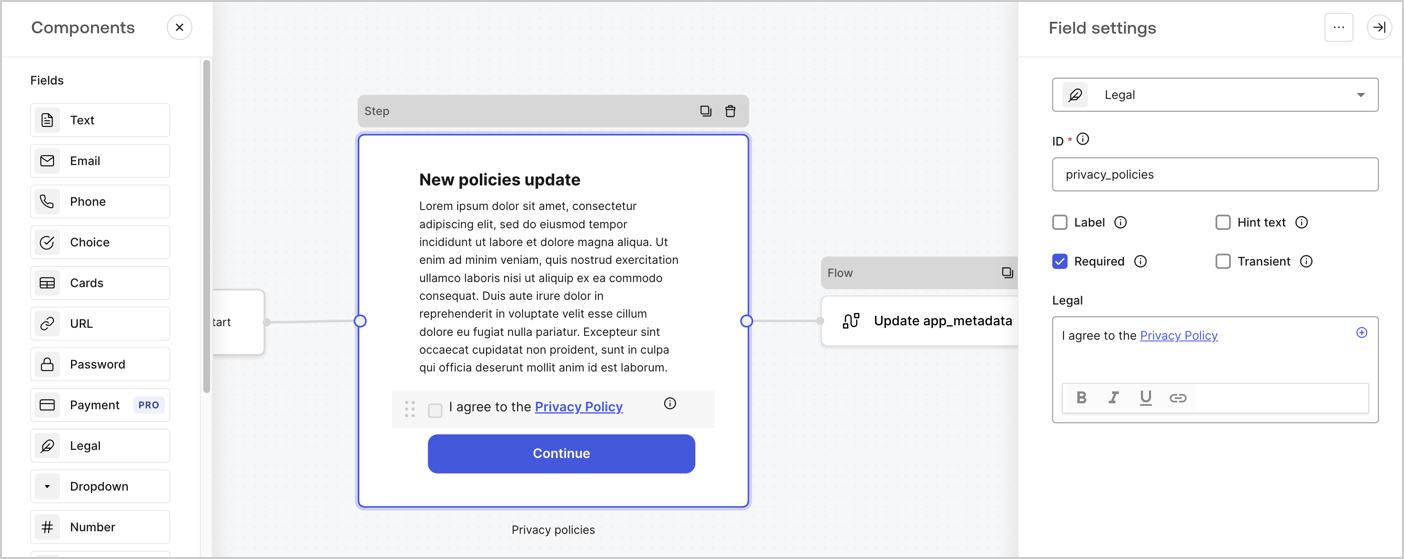
The Step node is the graphical interface visible to users. Add [Fields](/docs/customize/forms/nodes-and-components) to the Step node to collect the new agreement acceptance value by following these steps:

1. Drag a **Rich text** field from the **Components menu** into the **Step** node.

   * **Rich text**: Enter a description of your privacy policies updates.
   * Select **Save**.
2. Drag a **Legal** field into the **Step** node.

   * **ID**: Enter `privacy_policies`.
   * **Required**: Enable the checkbox.
   * **Legal**: Enter `I agree to the Privacy Policy`.
   * Select **Save**.
3. Select **Publish** to save.
<Frame>
  <img src="https://mintcdn.com/docs-staging-feat-acul-js-sdk-1-7-0-docs/p1pRgG0usRxks6z6/docs/images/cdy7uua7fh8z/59zFFjQjAnjogkc2QGIqqJ/0ad66b1b636544122aa4e65968b76c2c/privacy-policy-step-node.png?fit=max&auto=format&n=p1pRgG0usRxks6z6&q=85&s=43217e2b8b939099a8b2a74cef3b6ea6" alt="Dashboard > Actions > Forms > Use case privacy policy step node" data-og-width="1404" width="1404" data-og-height="559" height="559" data-path="docs/images/cdy7uua7fh8z/59zFFjQjAnjogkc2QGIqqJ/0ad66b1b636544122aa4e65968b76c2c/privacy-policy-step-node.png" data-optimize="true" data-opv="3" srcset="https://mintcdn.com/docs-staging-feat-acul-js-sdk-1-7-0-docs/p1pRgG0usRxks6z6/docs/images/cdy7uua7fh8z/59zFFjQjAnjogkc2QGIqqJ/0ad66b1b636544122aa4e65968b76c2c/privacy-policy-step-node.png?w=280&fit=max&auto=format&n=p1pRgG0usRxks6z6&q=85&s=51bb30a3ab32f8fe69e733bb194a9a08 280w, https://mintcdn.com/docs-staging-feat-acul-js-sdk-1-7-0-docs/p1pRgG0usRxks6z6/docs/images/cdy7uua7fh8z/59zFFjQjAnjogkc2QGIqqJ/0ad66b1b636544122aa4e65968b76c2c/privacy-policy-step-node.png?w=560&fit=max&auto=format&n=p1pRgG0usRxks6z6&q=85&s=b75a177cf63326f5ad02a5d1a1b38f07 560w, https://mintcdn.com/docs-staging-feat-acul-js-sdk-1-7-0-docs/p1pRgG0usRxks6z6/docs/images/cdy7uua7fh8z/59zFFjQjAnjogkc2QGIqqJ/0ad66b1b636544122aa4e65968b76c2c/privacy-policy-step-node.png?w=840&fit=max&auto=format&n=p1pRgG0usRxks6z6&q=85&s=e536dcbb715aed4e74f1631294017f8a 840w, https://mintcdn.com/docs-staging-feat-acul-js-sdk-1-7-0-docs/p1pRgG0usRxks6z6/docs/images/cdy7uua7fh8z/59zFFjQjAnjogkc2QGIqqJ/0ad66b1b636544122aa4e65968b76c2c/privacy-policy-step-node.png?w=1100&fit=max&auto=format&n=p1pRgG0usRxks6z6&q=85&s=bd614d20fa1e5c8d8cbdb4101476aa0e 1100w, https://mintcdn.com/docs-staging-feat-acul-js-sdk-1-7-0-docs/p1pRgG0usRxks6z6/docs/images/cdy7uua7fh8z/59zFFjQjAnjogkc2QGIqqJ/0ad66b1b636544122aa4e65968b76c2c/privacy-policy-step-node.png?w=1650&fit=max&auto=format&n=p1pRgG0usRxks6z6&q=85&s=f0e11fd4fb2d41cdde2231598e916a1f 1650w, https://mintcdn.com/docs-staging-feat-acul-js-sdk-1-7-0-docs/p1pRgG0usRxks6z6/docs/images/cdy7uua7fh8z/59zFFjQjAnjogkc2QGIqqJ/0ad66b1b636544122aa4e65968b76c2c/privacy-policy-step-node.png?w=2500&fit=max&auto=format&n=p1pRgG0usRxks6z6&q=85&s=e7515574693242f7d8e40dcdb935b03a 2500w" />
</Frame>

### Configure the Flow node

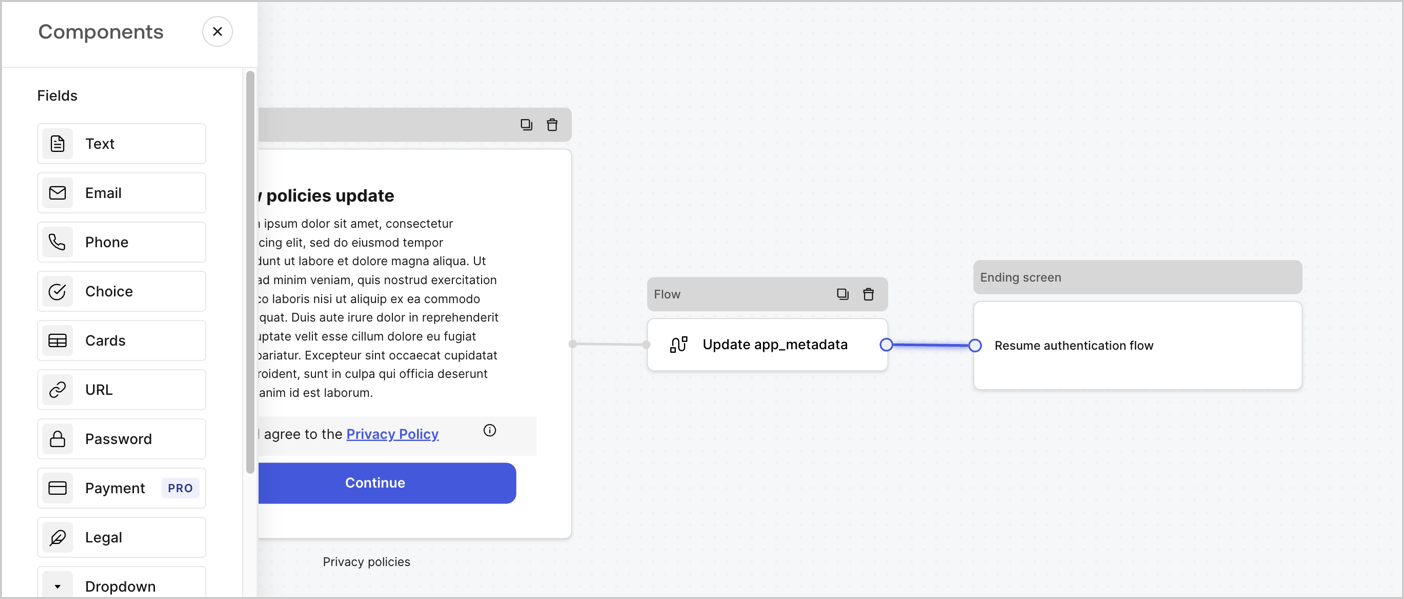
Add a **Flow** node after the **Step** node to update the `app_metadata` and resume the authentication flow by following these steps:

1. Select **Flow** from the bottom of the Form editor.
2. Remove the existing link between the **Step** and **Ending Screen** nodes.
3. Select the new **Flow** > **Click to add a flow** > **Create a new flow.**

   * Enter `Update app_metadata` in the **Name** field.
   * Select **Create**.
   * Select **Save**.
4. Link the **Flow** node to the **Step** and **Ending Screen** nodes as pictured below.
5. Select **Publish** to save.
<Frame>
  <img src="https://mintcdn.com/docs-staging-feat-acul-js-sdk-1-7-0-docs/BBoh2i8DRnlTJSC0/docs/images/cdy7uua7fh8z/6YIkzm7SrpM9LW76AXuRzh/353c518fe82bbaa440836da1d83596d6/link-policies.png?fit=max&auto=format&n=BBoh2i8DRnlTJSC0&q=85&s=45a4b2c93ddfe707c2fd9780999dca79" alt="Dashboard > Actions > Forms > Form" data-og-width="1404" width="1404" data-og-height="599" height="599" data-path="docs/images/cdy7uua7fh8z/6YIkzm7SrpM9LW76AXuRzh/353c518fe82bbaa440836da1d83596d6/link-policies.png" data-optimize="true" data-opv="3" srcset="https://mintcdn.com/docs-staging-feat-acul-js-sdk-1-7-0-docs/BBoh2i8DRnlTJSC0/docs/images/cdy7uua7fh8z/6YIkzm7SrpM9LW76AXuRzh/353c518fe82bbaa440836da1d83596d6/link-policies.png?w=280&fit=max&auto=format&n=BBoh2i8DRnlTJSC0&q=85&s=2d2a425c5c7c721551b24738323b33ea 280w, https://mintcdn.com/docs-staging-feat-acul-js-sdk-1-7-0-docs/BBoh2i8DRnlTJSC0/docs/images/cdy7uua7fh8z/6YIkzm7SrpM9LW76AXuRzh/353c518fe82bbaa440836da1d83596d6/link-policies.png?w=560&fit=max&auto=format&n=BBoh2i8DRnlTJSC0&q=85&s=0583899633d2695de0a8e19346dda7c7 560w, https://mintcdn.com/docs-staging-feat-acul-js-sdk-1-7-0-docs/BBoh2i8DRnlTJSC0/docs/images/cdy7uua7fh8z/6YIkzm7SrpM9LW76AXuRzh/353c518fe82bbaa440836da1d83596d6/link-policies.png?w=840&fit=max&auto=format&n=BBoh2i8DRnlTJSC0&q=85&s=62ee9b60275ce8c1d18d9b5b166a9dd8 840w, https://mintcdn.com/docs-staging-feat-acul-js-sdk-1-7-0-docs/BBoh2i8DRnlTJSC0/docs/images/cdy7uua7fh8z/6YIkzm7SrpM9LW76AXuRzh/353c518fe82bbaa440836da1d83596d6/link-policies.png?w=1100&fit=max&auto=format&n=BBoh2i8DRnlTJSC0&q=85&s=12e41a487d614b70890506b744ffbc69 1100w, https://mintcdn.com/docs-staging-feat-acul-js-sdk-1-7-0-docs/BBoh2i8DRnlTJSC0/docs/images/cdy7uua7fh8z/6YIkzm7SrpM9LW76AXuRzh/353c518fe82bbaa440836da1d83596d6/link-policies.png?w=1650&fit=max&auto=format&n=BBoh2i8DRnlTJSC0&q=85&s=7b7af9716d11261e7121470770a14e25 1650w, https://mintcdn.com/docs-staging-feat-acul-js-sdk-1-7-0-docs/BBoh2i8DRnlTJSC0/docs/images/cdy7uua7fh8z/6YIkzm7SrpM9LW76AXuRzh/353c518fe82bbaa440836da1d83596d6/link-policies.png?w=2500&fit=max&auto=format&n=BBoh2i8DRnlTJSC0&q=85&s=353620de5b8d87421f2765f5188564b1 2500w" />
</Frame>

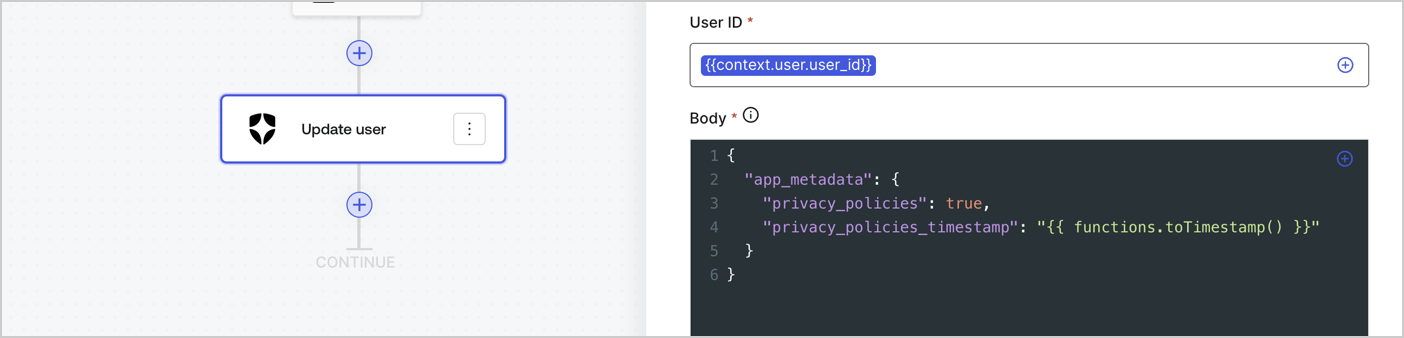
Add an Auth0 Update user action to the flow by following these steps:

1. Select the **Flow** **Update app\_metadata** > **Edit flow** to open the Flow editor in a new tab.
2. Below the StartAction, select the **+** icon to add an **Update user** action. Complete the fields below, then select **Save** to continue.

   * **Connection**: Select from the dropdown the Vault connection to your M2M application.

   * **User ID**: Enter `{{context.user.user_id}}`.

   * **Body**: Copy and paste the following code to update the app\_metadata with the privacy\_policies and privacy\_policies\_timestamp properties.

     ```text lines theme={null}
     {
       "app_metadata": {
         "privacy_policies": true,
         "privacy_policies_timestamp": "{{ functions.toTimestamp() }}"
       }
     }
     ```

   * Select **Save**.
3. Select **Publish** to save.
<Frame>
  <img src="https://mintcdn.com/docs-staging-feat-acul-js-sdk-1-7-0-docs/32e7TVx3XHhNqK7J/docs/images/cdy7uua7fh8z/CvMNIwWrOUwaFW4X3G28p/1fb70ae57a20749d9ffaaba8dc0b7e26/update-user-privacy.png?fit=max&auto=format&n=32e7TVx3XHhNqK7J&q=85&s=95a527fa7d5c7beb148371d997439e0f" alt="Dashboard > Actions > Forms > User case privacy policy code" data-og-width="1404" width="1404" data-og-height="338" height="338" data-path="docs/images/cdy7uua7fh8z/CvMNIwWrOUwaFW4X3G28p/1fb70ae57a20749d9ffaaba8dc0b7e26/update-user-privacy.png" data-optimize="true" data-opv="3" srcset="https://mintcdn.com/docs-staging-feat-acul-js-sdk-1-7-0-docs/32e7TVx3XHhNqK7J/docs/images/cdy7uua7fh8z/CvMNIwWrOUwaFW4X3G28p/1fb70ae57a20749d9ffaaba8dc0b7e26/update-user-privacy.png?w=280&fit=max&auto=format&n=32e7TVx3XHhNqK7J&q=85&s=49b23664f7720153190c117af3f713d7 280w, https://mintcdn.com/docs-staging-feat-acul-js-sdk-1-7-0-docs/32e7TVx3XHhNqK7J/docs/images/cdy7uua7fh8z/CvMNIwWrOUwaFW4X3G28p/1fb70ae57a20749d9ffaaba8dc0b7e26/update-user-privacy.png?w=560&fit=max&auto=format&n=32e7TVx3XHhNqK7J&q=85&s=8904a4e8c8c54eb26515e37fe35346eb 560w, https://mintcdn.com/docs-staging-feat-acul-js-sdk-1-7-0-docs/32e7TVx3XHhNqK7J/docs/images/cdy7uua7fh8z/CvMNIwWrOUwaFW4X3G28p/1fb70ae57a20749d9ffaaba8dc0b7e26/update-user-privacy.png?w=840&fit=max&auto=format&n=32e7TVx3XHhNqK7J&q=85&s=55fa81090433d34a4d0edb9075374063 840w, https://mintcdn.com/docs-staging-feat-acul-js-sdk-1-7-0-docs/32e7TVx3XHhNqK7J/docs/images/cdy7uua7fh8z/CvMNIwWrOUwaFW4X3G28p/1fb70ae57a20749d9ffaaba8dc0b7e26/update-user-privacy.png?w=1100&fit=max&auto=format&n=32e7TVx3XHhNqK7J&q=85&s=e300580d7c94e3a783a0760d71273fb5 1100w, https://mintcdn.com/docs-staging-feat-acul-js-sdk-1-7-0-docs/32e7TVx3XHhNqK7J/docs/images/cdy7uua7fh8z/CvMNIwWrOUwaFW4X3G28p/1fb70ae57a20749d9ffaaba8dc0b7e26/update-user-privacy.png?w=1650&fit=max&auto=format&n=32e7TVx3XHhNqK7J&q=85&s=e8d023444cfb32c14cc59af4b2fb0a89 1650w, https://mintcdn.com/docs-staging-feat-acul-js-sdk-1-7-0-docs/32e7TVx3XHhNqK7J/docs/images/cdy7uua7fh8z/CvMNIwWrOUwaFW4X3G28p/1fb70ae57a20749d9ffaaba8dc0b7e26/update-user-privacy.png?w=2500&fit=max&auto=format&n=32e7TVx3XHhNqK7J&q=85&s=6327a480d3f6a8e868d4cf72baf84915 2500w" />
</Frame>

<Callout icon="file-lines" color="#0EA5E9" iconType="regular">
  The flow **Update app\_metadata** adds a `privacy_policies true` value to the app`_metadata` object and also generates a timestamp with a [helper function.](/docs/customize/forms/variables)
</Callout>

## Retrieve the form render code

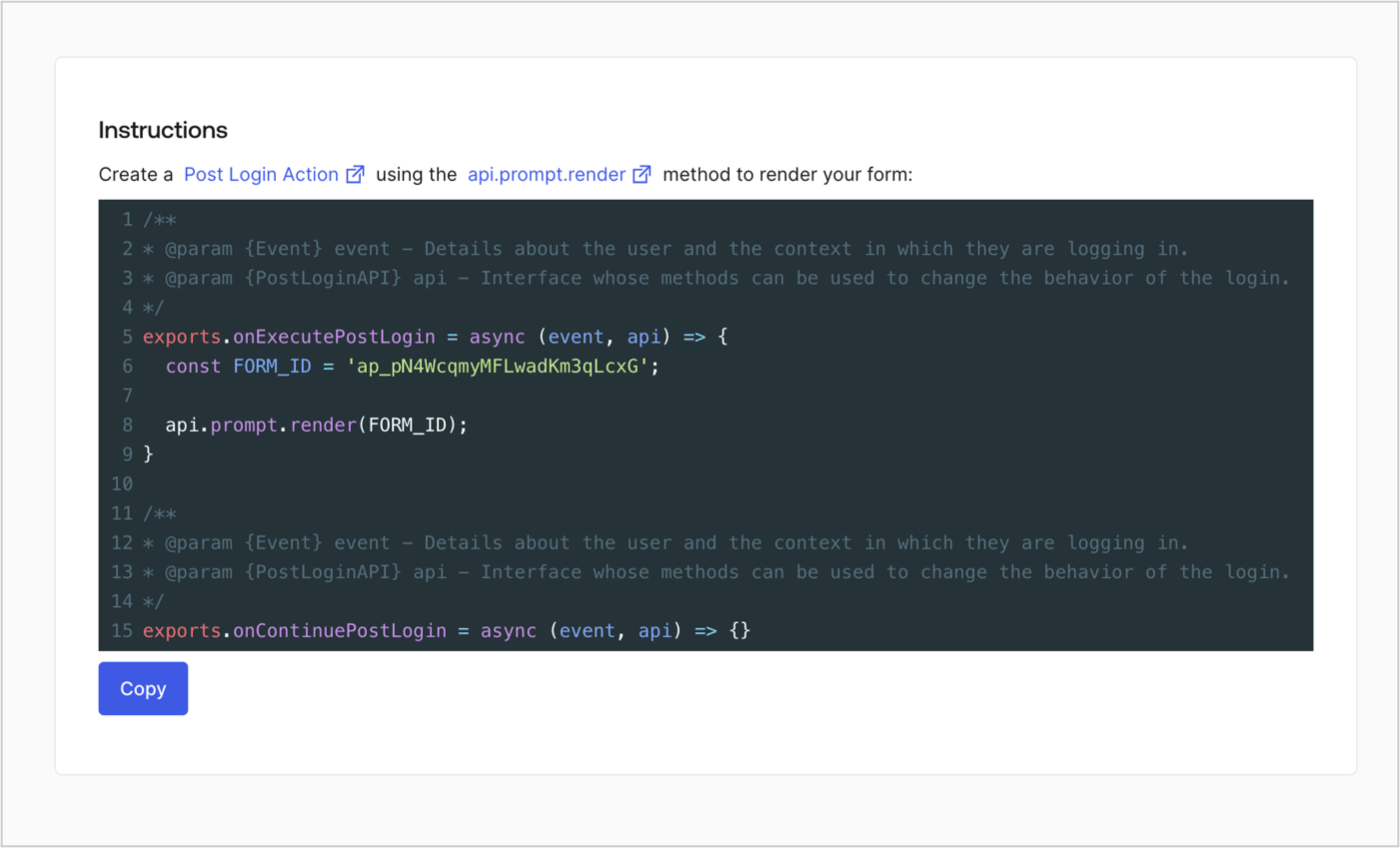
Retrieve your form render code to visually render the form with a custom Post Login Action by following these steps:

* From the Form editor, select **`<> Render`**.
* Select **Copy**.
<Frame>
  <img src="https://mintcdn.com/docs-staging-feat-acul-js-sdk-1-7-0-docs/YA6YwITUEnIUiKMc/docs/images/cdy7uua7fh8z/2EIUzc539sq9lwoTKbjoJv/496a864c0fc44a782c9cadca119dbfb0/embed.png?fit=max&auto=format&n=YA6YwITUEnIUiKMc&q=85&s=be6e1ef672bb02109867adef16576209" alt="Dashboard > Actions > Forms > Form > Embed" data-og-width="1400" width="1400" data-og-height="848" height="848" data-path="docs/images/cdy7uua7fh8z/2EIUzc539sq9lwoTKbjoJv/496a864c0fc44a782c9cadca119dbfb0/embed.png" data-optimize="true" data-opv="3" srcset="https://mintcdn.com/docs-staging-feat-acul-js-sdk-1-7-0-docs/YA6YwITUEnIUiKMc/docs/images/cdy7uua7fh8z/2EIUzc539sq9lwoTKbjoJv/496a864c0fc44a782c9cadca119dbfb0/embed.png?w=280&fit=max&auto=format&n=YA6YwITUEnIUiKMc&q=85&s=45c65349d4e8a96a96b4bee24751843b 280w, https://mintcdn.com/docs-staging-feat-acul-js-sdk-1-7-0-docs/YA6YwITUEnIUiKMc/docs/images/cdy7uua7fh8z/2EIUzc539sq9lwoTKbjoJv/496a864c0fc44a782c9cadca119dbfb0/embed.png?w=560&fit=max&auto=format&n=YA6YwITUEnIUiKMc&q=85&s=c89dc449904c5fff9d9a61aef4939ed1 560w, https://mintcdn.com/docs-staging-feat-acul-js-sdk-1-7-0-docs/YA6YwITUEnIUiKMc/docs/images/cdy7uua7fh8z/2EIUzc539sq9lwoTKbjoJv/496a864c0fc44a782c9cadca119dbfb0/embed.png?w=840&fit=max&auto=format&n=YA6YwITUEnIUiKMc&q=85&s=2f1c9dda0f8f8b0b27c366294d50669b 840w, https://mintcdn.com/docs-staging-feat-acul-js-sdk-1-7-0-docs/YA6YwITUEnIUiKMc/docs/images/cdy7uua7fh8z/2EIUzc539sq9lwoTKbjoJv/496a864c0fc44a782c9cadca119dbfb0/embed.png?w=1100&fit=max&auto=format&n=YA6YwITUEnIUiKMc&q=85&s=0b30c2f8502cd7ec5b83d7463ee4a543 1100w, https://mintcdn.com/docs-staging-feat-acul-js-sdk-1-7-0-docs/YA6YwITUEnIUiKMc/docs/images/cdy7uua7fh8z/2EIUzc539sq9lwoTKbjoJv/496a864c0fc44a782c9cadca119dbfb0/embed.png?w=1650&fit=max&auto=format&n=YA6YwITUEnIUiKMc&q=85&s=2d8985392142c1d4b7bc6cdf6a98f6f8 1650w, https://mintcdn.com/docs-staging-feat-acul-js-sdk-1-7-0-docs/YA6YwITUEnIUiKMc/docs/images/cdy7uua7fh8z/2EIUzc539sq9lwoTKbjoJv/496a864c0fc44a782c9cadca119dbfb0/embed.png?w=2500&fit=max&auto=format&n=YA6YwITUEnIUiKMc&q=85&s=ddbb37af5e0ebb8b6172b332a264b8bc 2500w" />
</Frame>

## Create a Post Login Action

Create a post-login Action to render your form by following these steps:

1. Navigate to **Auth0 Dashboard > Actions > Flows > Login.**
2. Select the **+** icon and Select **Build from scratch**:

   * **Name**: Enter `Render Update Policy Form`.
   * **Trigger**: Select `Login / Post Login`.
   * **Runtime**: Select the recommended version.
3. Select **Create**.

To configure the post-login Action:

1. Delete the existing code from the Code editor.
2. Paste the form render code into the Code editor.
3. Edit the code to define the conditional logic that will render the form.

   ```javascript lines theme={null}
   /**
   * @param {Event} event - Details about the user and the context in which they are logging in.
   * @param {PostLoginAPI} api - Interface whose methods can be used to change the behavior of the login.
   */
   exports.onExecutePostLogin = async (event, api) => {
     const FORM_ID = 'REPLACE_WITH_YOUR_FORM_ID';

     if (event.user.app_metadata.privacy_policies !== true) {
       api.prompt.render(FORM_ID);
     }
   }

   exports.onContinuePostLogin = async (event, api) => { }
   ```

   <Callout icon="file-lines" color="#0EA5E9" iconType="regular">
     The example code above will render the form when a user is missing the app metadata `privacy_policies` property.
   </Callout>
4. Select **Deploy.**
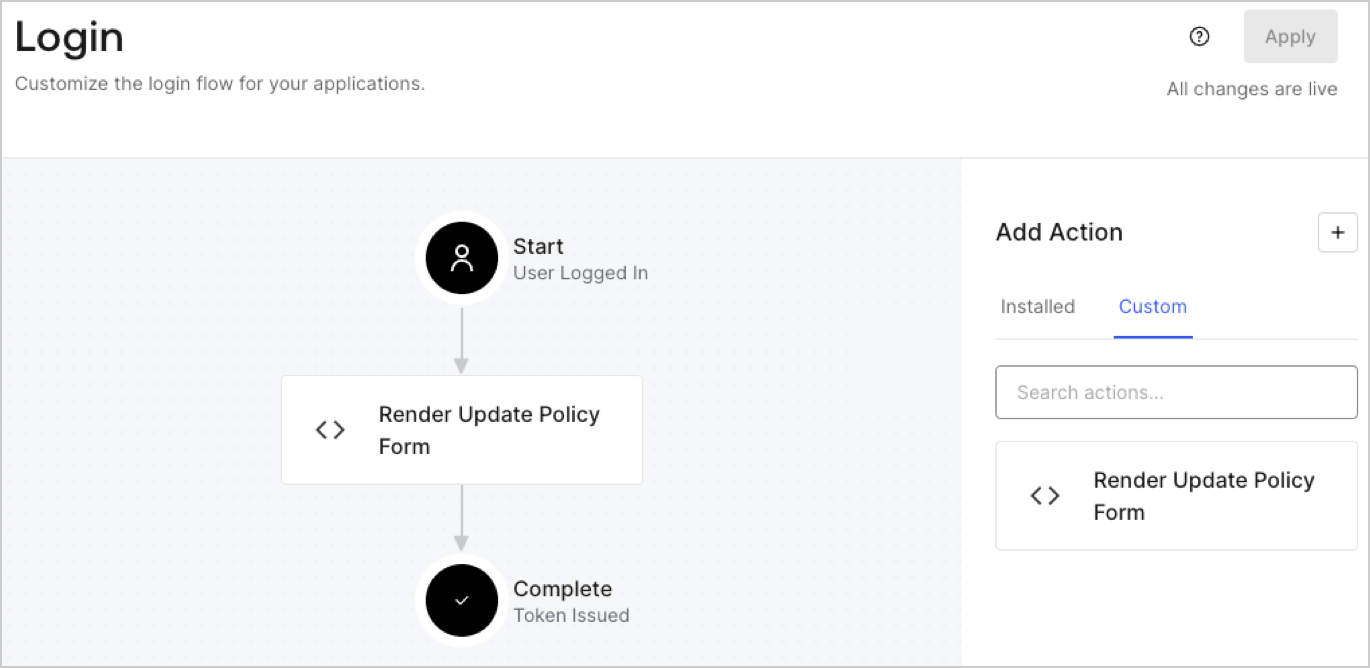
5. Drag and Drop the **Render Update Policy Form** Action to the **Login** flow.
   <Frame>
     <img src="https://mintcdn.com/docs-staging-feat-acul-js-sdk-1-7-0-docs/Yz2uQfY-DVUNvuqK/docs/images/cdy7uua7fh8z/5TOwDgevZsBqd7yZynUYWU/41ca909dc3007aed4f40ff794a05efa5/postlogin.png?fit=max&auto=format&n=Yz2uQfY-DVUNvuqK&q=85&s=33ff4ffb7187d9465619d4b34f7c958c" alt="Dashboard > Forms > Use Case > Render update policy form login action" data-og-width="1370" width="1370" data-og-height="668" height="668" data-path="docs/images/cdy7uua7fh8z/5TOwDgevZsBqd7yZynUYWU/41ca909dc3007aed4f40ff794a05efa5/postlogin.png" data-optimize="true" data-opv="3" srcset="https://mintcdn.com/docs-staging-feat-acul-js-sdk-1-7-0-docs/Yz2uQfY-DVUNvuqK/docs/images/cdy7uua7fh8z/5TOwDgevZsBqd7yZynUYWU/41ca909dc3007aed4f40ff794a05efa5/postlogin.png?w=280&fit=max&auto=format&n=Yz2uQfY-DVUNvuqK&q=85&s=5b2627cc62dfe325700613ff75f68daa 280w, https://mintcdn.com/docs-staging-feat-acul-js-sdk-1-7-0-docs/Yz2uQfY-DVUNvuqK/docs/images/cdy7uua7fh8z/5TOwDgevZsBqd7yZynUYWU/41ca909dc3007aed4f40ff794a05efa5/postlogin.png?w=560&fit=max&auto=format&n=Yz2uQfY-DVUNvuqK&q=85&s=79a9db18ec5574eda26226616f1ce8b8 560w, https://mintcdn.com/docs-staging-feat-acul-js-sdk-1-7-0-docs/Yz2uQfY-DVUNvuqK/docs/images/cdy7uua7fh8z/5TOwDgevZsBqd7yZynUYWU/41ca909dc3007aed4f40ff794a05efa5/postlogin.png?w=840&fit=max&auto=format&n=Yz2uQfY-DVUNvuqK&q=85&s=a07c947d3b5d2a3f53ebe07fe4ab163e 840w, https://mintcdn.com/docs-staging-feat-acul-js-sdk-1-7-0-docs/Yz2uQfY-DVUNvuqK/docs/images/cdy7uua7fh8z/5TOwDgevZsBqd7yZynUYWU/41ca909dc3007aed4f40ff794a05efa5/postlogin.png?w=1100&fit=max&auto=format&n=Yz2uQfY-DVUNvuqK&q=85&s=b4cffd13425a8cd4b2433adbe3a0c875 1100w, https://mintcdn.com/docs-staging-feat-acul-js-sdk-1-7-0-docs/Yz2uQfY-DVUNvuqK/docs/images/cdy7uua7fh8z/5TOwDgevZsBqd7yZynUYWU/41ca909dc3007aed4f40ff794a05efa5/postlogin.png?w=1650&fit=max&auto=format&n=Yz2uQfY-DVUNvuqK&q=85&s=8dbe3d07ee5f52f1b8f29ec343f390a3 1650w, https://mintcdn.com/docs-staging-feat-acul-js-sdk-1-7-0-docs/Yz2uQfY-DVUNvuqK/docs/images/cdy7uua7fh8z/5TOwDgevZsBqd7yZynUYWU/41ca909dc3007aed4f40ff794a05efa5/postlogin.png?w=2500&fit=max&auto=format&n=Yz2uQfY-DVUNvuqK&q=85&s=9eca09988aed470a89d80744156811d1 2500w" />
   </Frame>
6. Select **Apply.**

### Test implementation

Test the implementation by following these steps:

1. Log in with an existing user whose app`_metadata` attribute `privacy_policies` does not have a value.
2. The post-login Action in the Login flow will render the form and prompt for acceptance.
3. Select **Auth0 Dashboard > User Management > Users,** locate the user and verify that the `app_metadata` attribute `privacy_policies` contains a `true` value and a timestamp.
